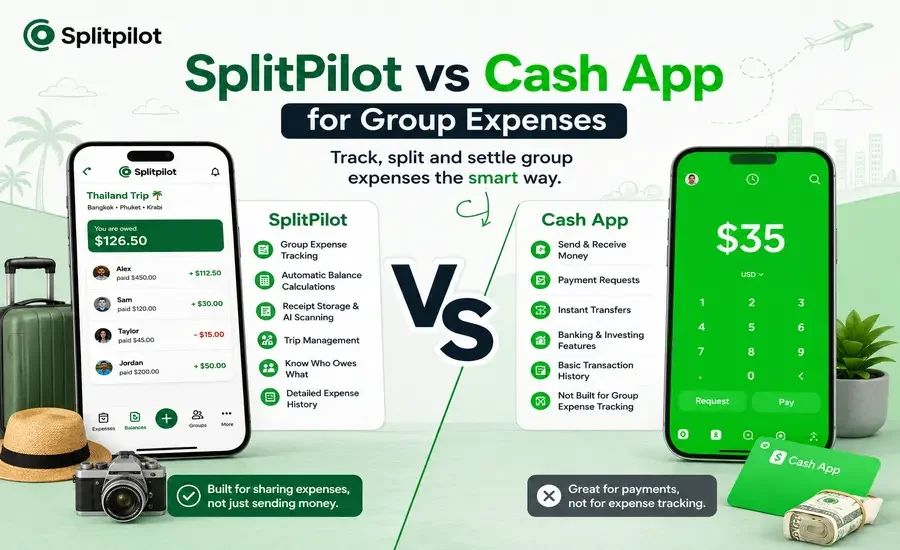
Splitting expenses with friends should be quick, transparent, and stress-free. Whether you're planning a weekend getaway, sharing rent with roommates, or dividing the dinner bill, the right app can save everyone from awkward payment reminders and confusing calculations.
Many people already use Cash App to send and receive money, so it's natural to wonder if it can also handle shared expenses. While Cash App is excellent for peer-to-peer payments, it wasn't designed to manage ongoing group expenses. That's where dedicated expense-sharing apps like SplitPilot offer a different experience.
In this comparison, we'll look at how SplitPilot and Cash App compare for group expenses, their strengths, limitations, and which app is the better choice depending on your needs.
Quick Comparison
Feature | SplitPilot | Cash App |
Primary Purpose | Shared expense tracking | Peer-to-peer payments |
Group Expense Management | ✅ Yes | ❌ No |
Automatic Balance Calculation | ✅ Yes | ❌ No |
Split Bills Between Multiple People | ✅ Yes | Limited |
Track Who Owes Whom | ✅ Yes | ❌ No |
Receipt Storage | ✅ Yes | ❌ No |
AI Receipt Scanning | ✅ Premium | ❌ No |
Trip Expense Tracking | ✅ Yes | ❌ No |
Payment Transfers | ❌ Uses external payment methods | ✅ Yes |
Expense History | ✅ Organized by groups | Basic payment history |
What Is SplitPilot?
SplitPilot is a dedicated expense-sharing app built to simplify shared finances. Instead of manually calculating everyone's share, it automatically tracks expenses, calculates balances, and shows exactly who owes whom.
It's ideal for:
Friends sharing bills
Roommates splitting rent and utilities
Family vacations
Group trips
Events and parties
Clubs and small teams
Rather than replacing your preferred payment method, SplitPilot focuses on organizing expenses before everyone settles up.
What Is Cash App?
Cash App is primarily a digital payment platform that allows users to:
Send money
Receive payments
Request money
Use a debit card
Buy Bitcoin
Invest in stocks
It's excellent for transferring money between individuals, but it doesn't provide tools specifically built for managing shared expenses across a group.
SplitPilot vs Cash App: Feature Comparison
1. Group Expense Tracking
SplitPilot
Designed specifically for groups.
You can:
Create multiple groups
Add members
Record shared expenses
Split costs equally or with custom amounts
Track balances automatically
Everything stays organized in one place.
Cash App
Cash App allows you to request or send payments, but every expense must be calculated manually before requesting money.
Winner: SplitPilot
2. Splitting Bills
Imagine six friends go out for dinner.
With SplitPilot
Add the restaurant bill
Select participants
Choose how to split
Everyone's balance updates instantly
With Cash App
You need to:
Calculate each person's share
Send individual payment requests
Keep track of who has paid
Winner: SplitPilot
3. Trip Expense Management
Travel involves many shared costs:
Hotels
Flights
Fuel
Activities
Food
Shopping
SplitPilot organizes everything inside a single trip group.
Cash App simply processes payments after you've already calculated them elsewhere.
Winner: SplitPilot
4. Receipt Management
One common challenge is remembering who paid for what.
SplitPilot lets users attach receipts to expenses, and Premium users can use AI receipt scanning to extract expense details quickly.
Cash App stores payment records but doesn't organize receipts for shared expense tracking.
Winner: SplitPilot
5. Payment Transfers
This is where Cash App shines.
Users can instantly:
Send money
Request money
Receive payments
SplitPilot focuses on expense management rather than acting as a payment processor, allowing users to settle balances using their preferred payment method.
Winner: Cash App
6. Expense History
SplitPilot keeps expenses organized by:
Group
Trip
Event
Date
Members
This makes reviewing past expenses simple.
Cash App provides a transaction history but doesn't categorize shared expenses into groups.
Winner: SplitPilot
Pros and Cons
SplitPilot
Pros
Built specifically for shared expenses
Automatic balance calculations
Group-based organization
Trip expense tracking
Receipt storage
AI receipt scanning (Premium)
Clean expense summaries
Cons
Doesn't process payments directly
Cash App
Pros
Fast money transfers
Simple interface
Popular in the United States
Supports payment requests
Additional banking and investing features
Cons
No group expense tracking
Manual calculations required
No automatic settlements
No receipt organization
Limited collaboration for groups
Which App Is Better for Different Situations?
Choose SplitPilot if you:
Frequently split expenses with friends
Travel in groups
Live with roommates
Want automatic calculations
Need receipt tracking
Prefer organized expense records
Choose Cash App if you:
Mainly need to send or receive money
Split expenses only occasionally
Don't need group management
Already know how much each person owes
Can You Use Both Together?
Absolutely.
Many groups use SplitPilot to calculate balances and organize expenses, then use Cash App to send the final payments.
This combination gives you the best of both worlds:
SplitPilot handles the calculations.
Cash App handles the money transfer.
Frequently Asked Questions
Is Cash App good for splitting group expenses?
Cash App works well for sending payments, but it doesn't automatically calculate or track shared expenses for groups.
Can SplitPilot replace Cash App?
Not entirely. SplitPilot is designed for expense tracking rather than payment processing. Many users pair it with their preferred payment service.
Which app is better for vacations?
SplitPilot is generally better for travel because it keeps all shared expenses, balances, and receipts organized throughout the trip.
Does SplitPilot support receipt scanning?
Yes. Premium users can scan receipts with AI to automatically capture expense details and reduce manual entry.
Is Cash App free to use?
Most standard peer-to-peer transfers are free, although certain services and instant transfers may involve fees depending on your account and transfer method.
Final Verdict
Cash App is an excellent choice when your goal is simply to send or receive money. However, once multiple people start sharing expenses over several days or weeks, manually calculating balances and keeping track of payments can become time-consuming.
SplitPilot is built specifically for those situations. It automates balance calculations, organizes expenses by group or trip, stores receipts, and makes it easy to see who owes what all before it's time to settle up.
For the smoothest experience, many users choose to track expenses with SplitPilot and complete the final payment using Cash App.