Managing shared expenses is easier than ever thanks to modern expense-sharing apps. However, manually entering every restaurant bill, grocery receipt, utility payment, or travel expense can still be time-consuming.
That's where receipt scanning comes in.
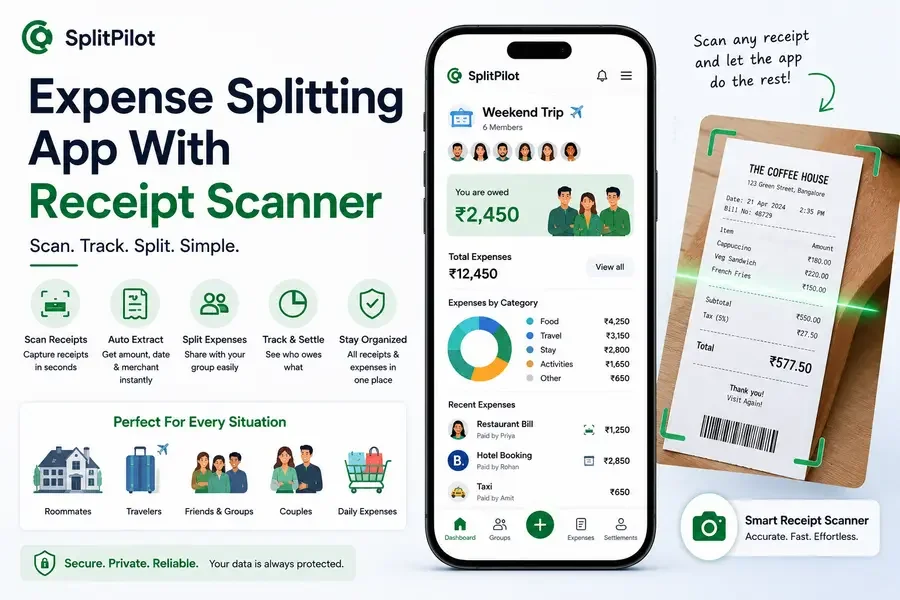
An expense splitting app with receipt scanner allows users to quickly capture receipts, automatically extract expense details, and instantly split costs among group members. Whether you're traveling with friends, sharing rent with roommates, or managing household expenses, receipt scanning can significantly reduce manual work.
In this guide, we'll explore the benefits of receipt scanners, how they work, and what features to look for when choosing the right expense tracking app.
What Is a Receipt Scanner?
A receipt scanner is a feature that allows users to take a photo of a receipt and automatically convert it into expense data.
Instead of manually entering:
Amount paid
Merchant name
Date
Expense category
the app reads the receipt and fills in the information automatically.
This saves time and reduces data entry errors.
Why Receipt Scanning Is Becoming Essential
Shared expenses often involve numerous transactions.
Examples include:
Restaurant bills
Grocery shopping
Utility payments
Travel bookings
Event expenses
Group purchases
Manually recording every expense can become frustrating, especially in larger groups.
Many users looking for a modern expense tracker app now prioritize receipt scanning because it streamlines the entire expense management process.
How Receipt Scanning Improves Expense Splitting
Faster Expense Entry
Instead of typing expense details manually, users simply upload or photograph a receipt.
The app processes the information automatically.
Better Accuracy
Manual entry mistakes can lead to disputes over balances and settlements.
Receipt scanning helps ensure expenses are recorded correctly.
Easier Group Management
For travel groups and shared households, expense records remain organized and verifiable.
Improved Transparency
Everyone can view the original receipt, reducing confusion about who paid and how much was spent.
Who Benefits Most From Receipt Scanning?
Roommates
Roommates often share:
Rent
Utilities
Groceries
Internet bills
Household supplies
Receipt scanning makes it easier to track these expenses accurately.
If you regularly split household costs, our guide on how to divide rent and utility bills fairly provides additional tips for managing shared finances.
Travelers
Travel expenses can accumulate quickly.
Common travel expenses include:
Hotels
Flights
Transportation
Restaurants
Activities
Instead of saving paper receipts, travelers can scan and store them directly in the app.
Users searching for the best travel expense sharing apps often prioritize receipt scanning because it simplifies trip accounting.
Couples
Couples who share expenses can use receipt scanning to organize:
Dining expenses
Shopping
Household purchases
Vacation costs
The process eliminates the need for manual expense tracking.
Friends and Groups
Whether planning a wedding, bachelor trip, or group event, receipt scanning helps maintain accurate spending records.
This is particularly useful for large groups with dozens of shared expenses.
Key Features to Look For in an Expense Splitting App With Receipt Scanner
Not all receipt scanners are equally effective.
When comparing apps, look for:
Automatic Receipt Recognition
The app should automatically identify:
Total amount
Merchant
Date
Expense category
Group Expense Tracking
The platform should allow users to assign scanned expenses directly to groups.
Smart Categorization
Modern apps automatically categorize expenses such as:
Food
Travel
Utilities
Entertainment
Settlement Tracking
Users should be able to see who owes money and how much after expenses are recorded.
Cloud Synchronization
Expenses should sync across devices in real time.
Why Modern Expense Sharing Apps Are Adding AI
Artificial intelligence is transforming expense management.
Modern platforms now offer:
Receipt scanning
Smart categorization
Spending insights
Expense recommendations
Automated reporting
These features reduce administrative work and make shared expense management more efficient.
If you're comparing available platforms, our expense tracking app comparison guide explores how modern solutions differ from traditional bill-splitting apps.
Receipt Scanner vs Manual Expense Entry
Feature | Receipt Scanner | Manual Entry |
Speed | Fast | Slow |
Accuracy | High | Moderate |
Effort Required | Low | High |
Receipt Storage | Automatic | Manual |
Expense Verification | Easy | Limited |
Group Transparency | High | Moderate |
For most users, receipt scanning offers a significantly better experience.
How SplitPilot Uses Receipt Scanning
SplitPilot combines receipt scanning with modern group expense tracker functionality.
Users can:
Scan receipts instantly
Track shared expenses
Organize spending categories
Simplify settlements
Monitor group balances
Manage household budgets
This makes it useful for roommates, travelers, families, and anyone who regularly shares expenses.
Common Use Cases
Shared Apartments
Track rent, groceries, and utility bills.
Group Vacations
Manage accommodation, food, and transportation costs.
Family Expenses
Organize shared household purchases.
Events
Track wedding, party, and celebration expenses.
Users planning large events may also benefit from reading our guide on managing wedding expenses with friends and family.
Choosing the Right Expense Splitting App
Before selecting an app, consider:
Receipt scanning quality
Expense tracking features
Settlement calculations
Reporting capabilities
User experience
Group management tools
The best solution should save time while making shared finances easier to understand.
Final Thoughts
Receipt scanning has become one of the most valuable features in modern expense-sharing apps. By reducing manual data entry, improving accuracy, and increasing transparency, it helps users manage shared finances more efficiently.
Whether you're splitting rent with roommates, organizing travel expenses, or tracking household spending, an expense splitting app with receipt scanner can simplify the process significantly.
For users seeking a complete shared expense management platform, combining receipt scanning with group expense tracking and settlement management provides the best overall experience.