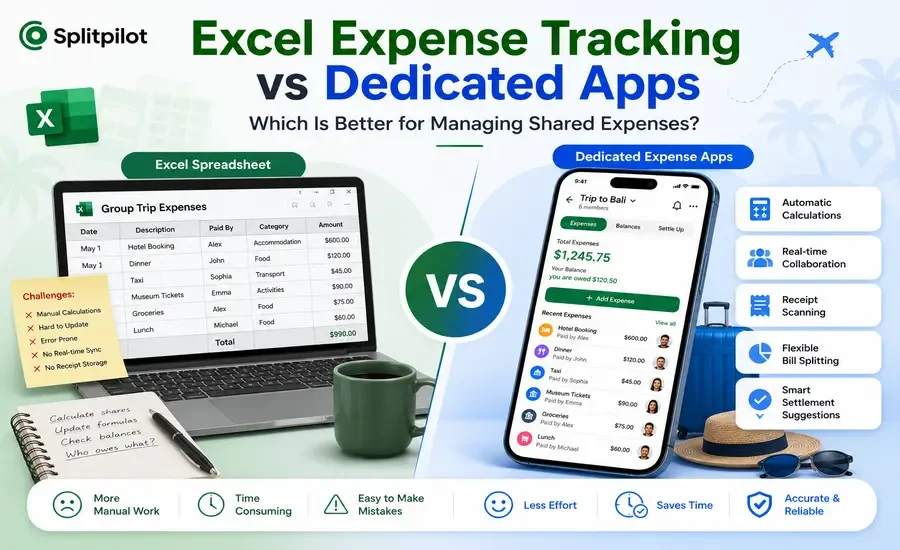
For years, Excel spreadsheets have been the go-to solution for tracking shared expenses. They're flexible, familiar, and free for many users. Whether it's a family vacation, a college trip, or monthly household bills, chances are someone in the group has created an Excel sheet to keep everything organized.
But as group expenses become more frequent and more complicated, many people are finding that spreadsheets require more effort than they're worth.
Dedicated expense-sharing apps have changed the way groups manage money. Instead of manually updating formulas and calculating balances, these apps automate the entire process.
If you're wondering whether to continue using Excel or switch to a dedicated expense management app, this guide will help you compare both options and decide which works best for your needs.
Why People Still Use Excel
Excel has remained popular because it's incredibly versatile. You can create custom tables, add formulas, and organize expenses however you like.
For small projects or personal budgeting, it can still be a practical choice.
People often choose Excel because:
Most people already know how to use it.
It's easy to customize.
You can create your own formulas.
It works for almost any type of budget.
Files can be shared with others.
However, flexibility also means more manual work, especially when multiple people are involved.
Where Excel Starts to Fall Short
Imagine you're traveling with six friends for a week.
Every day, someone pays for breakfast, another books activities, someone else pays for transportation, and another covers dinner. Every expense has to be entered manually into the spreadsheet.
Then someone accidentally deletes a formula.
Or two people edit the file at the same time.
Or someone forgets to update their payment.
Before long, everyone is asking the same question:
"Who actually owes what?"
That's one of the biggest reasons many groups move away from spreadsheets.
What Are Dedicated Expense Apps?
Dedicated expense-sharing apps are designed specifically to manage group expenses.
Instead of creating formulas yourself, the app automatically:
Records expenses
Calculates balances
Tracks payments
Splits bills fairly
Suggests settlements
Keeps everyone updated
Apps like SplitPilot remove most of the manual work, making shared expense management much easier.
Excel vs Dedicated Expense Apps
1. Ease of Use
Excel
Setting up an expense tracker in Excel usually requires creating columns, formulas, and balance calculations.
If someone accidentally changes a formula, the entire sheet can produce incorrect results.
Dedicated Apps
Dedicated apps are ready to use immediately.
Create a group, invite members, and start adding expenses.
No formulas.
No calculations.
No spreadsheet knowledge required.
Winner: ✅ Dedicated Apps
2. Automatic Calculations
Excel depends entirely on your formulas.
Whenever expenses change, you must ensure every calculation remains correct.
Expense apps automatically update balances after every transaction.
Nobody has to perform manual calculations.
Winner: ✅ Dedicated Apps
3. Group Collaboration
Sharing an Excel file with multiple people can quickly become confusing.
Different file versions, accidental edits, and conflicting changes often create unnecessary problems.
Dedicated apps allow everyone to add expenses in real time while keeping a single shared record.
Winner: ✅ Dedicated Apps
4. Bill Splitting Options
Excel can split bills but only if you build the formulas yourself.
Dedicated apps already support:
Equal splits
Percentage splits
Custom amounts
Individual shares
This makes complicated expenses much easier to manage.
If you're curious how dedicated apps compare with traditional payment apps, check out our SplitPilot vs Venmo for Shared Expenses comparison.
Winner: ✅ Dedicated Apps
5. Travel Expense Management
Travel is one of the biggest reasons people stop using spreadsheets.
Managing hotels, transportation, restaurants, shopping, and activities inside Excel quickly becomes difficult.
Dedicated apps organize every expense inside a trip while automatically calculating balances.
If you're planning a group vacation, you might also like our article on Apps Like Splid, which explores travel-focused expense-sharing apps.
Winner: ✅ Dedicated Apps
6. Receipt Management
Excel doesn't store receipts unless you manually attach files or links.
Modern expense apps allow users to scan receipts directly from their phone, making record keeping much faster.
No more searching through paper receipts after a trip.
Winner: ✅ Dedicated Apps
7. Settlement Suggestions
One of Excel's biggest limitations is settlement planning.
After calculating balances, someone still has to decide the easiest way for everyone to pay each other back.
Dedicated apps automatically minimize the number of transactions.
Instead of five separate payments, the app may recommend only two.
Winner: ✅ Dedicated Apps
Quick Comparison
Feature | Excel | Dedicated Expense Apps |
Easy Setup | ⭐⭐⭐ | ⭐⭐⭐⭐⭐ |
Automatic Calculations | ❌ | ✅ |
Real-Time Collaboration | Limited | ✅ |
Receipt Scanning | ❌ | ✅ |
Flexible Bill Splitting | Manual | ✅ |
Settlement Suggestions | ❌ | ✅ |
Travel Expense Tracking | Manual | ✅ |
Mobile Experience | Limited | Excellent |
AI Assistance | ❌ | Available in modern apps |
When Excel Is Still a Good Choice
Excel works well if:
You're managing your own budget.
Only one person updates the file.
Your expenses are simple.
You don't need real-time collaboration.
You're comfortable working with formulas.
For individual finance tracking, Excel remains a powerful tool.
When a Dedicated Expense App Makes More Sense
Dedicated apps are a better choice when:
You travel with friends.
You live with roommates.
You split household expenses.
You organize events.
You need multiple people to update expenses.
You want automatic calculations.
You prefer managing everything from your phone.
The larger your group becomes, the bigger the advantage.
Why More Groups Are Moving Away from Spreadsheets
Over the last few years, expectations have changed.
People now expect apps to:
Sync automatically
Calculate balances instantly
Store receipts
Notify group members
Suggest settlements
Work across multiple devices
Spreadsheets can certainly accomplish some of these tasks, but only with significantly more effort.
Dedicated apps are built specifically for these situations, which makes them faster, simpler, and less prone to mistakes.
Frequently Asked Questions
Is Excel good for tracking shared expenses?
Yes, but it's best suited for small groups or simple budgets. As expenses become more complex, spreadsheets require more manual work and become harder to maintain.
Why use a dedicated expense app instead of Excel?
Dedicated apps automatically calculate balances, support multiple bill-splitting methods, sync across devices, and eliminate the need for manual formulas.
Can Excel split bills?
Yes. However, users must create and maintain their own formulas, whereas dedicated apps provide built-in bill splitting.
Which option is better for travel?
Dedicated expense apps are generally the better choice because they simplify expense tracking, receipt management, and balance calculations throughout the trip.
Final Verdict
Excel has been a reliable budgeting tool for decades, and it still works well for personal finance or simple expense tracking.
However, when multiple people are sharing expenses, spreadsheets quickly become difficult to maintain. Manual calculations, version conflicts, and formula errors can create unnecessary confusion.
Dedicated expense-sharing apps solve these problems by automating calculations, organizing every expense in one place, and helping groups settle up fairly.
If you regularly travel with friends, split rent with roommates, or manage shared household costs, switching from Excel to a dedicated expense app can save time, reduce mistakes, and make managing group expenses much less stressful.