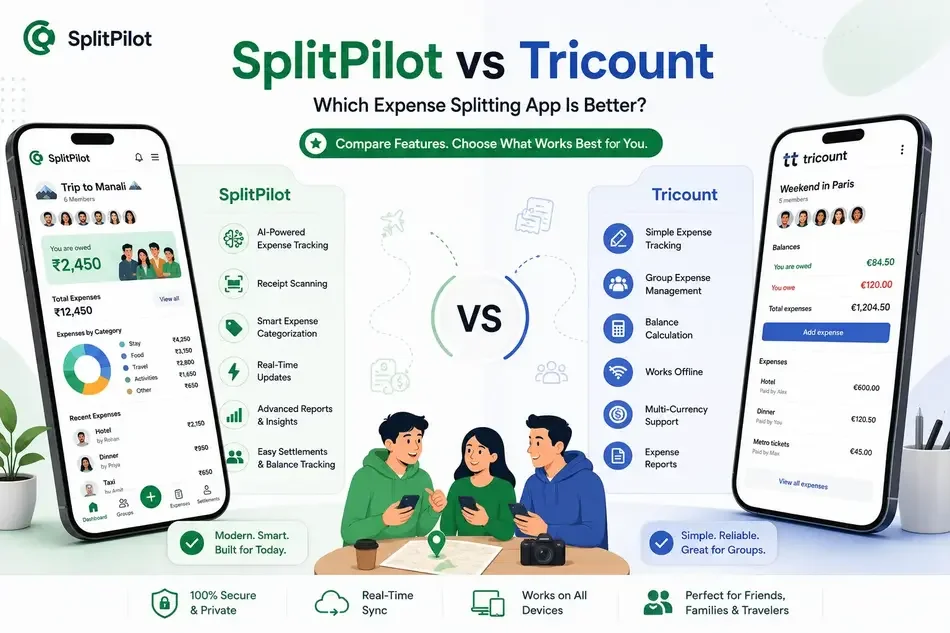
Managing shared expenses shouldn't be complicated. Whether you're traveling with friends, splitting rent with roommates, or sharing household bills, the right expense-sharing app can save time and prevent awkward money conversations.
Two popular options in this space are SplitPilot and Tricount. While both help users split expenses and track group spending, they take different approaches to expense management.
In this comparison, we'll look at their features, usability, pricing, and overall experience to help you decide which solution is right for your needs.
Quick Comparison
Feature | SplitPilot | Tricount |
Expense Splitting | ✅ | ✅ |
Group Expense Tracking | ✅ | ✅ |
Receipt Scanning | ✅ | Limited |
AI-Powered Features | ✅ | ❌ |
Settlement Tracking | ✅ | ✅ |
Real-Time Updates | ✅ | ✅ |
Travel Expense Management | ✅ | ✅ |
Modern User Interface | ✅ | Moderate |
Free Usage Options | ✅ | ✅ |
What Is SplitPilot?
SplitPilot is a modern expense tracker app designed to make shared expense management simple for friends, roommates, couples, and travel groups.
The platform focuses on:
Fast expense entry
Smart settlement calculations
Group expense tracking
Receipt scanning
AI-powered expense management
Easy bill splitting
Whether you're planning a vacation or managing monthly household expenses, SplitPilot helps users split expenses online without complicated spreadsheets.
What Is Tricount?
Tricount is a long-standing expense-sharing application that allows users to create groups, record expenses, and calculate balances between participants.
It is commonly used for:
Travel groups
Roommate expenses
Family events
Shared purchases
Weekend trips
The app provides a straightforward approach to tracking who paid and who owes money.
User Interface Comparison
SplitPilot
SplitPilot offers a modern interface designed for speed and simplicity.
Users can:
Add expenses quickly
View balances instantly
Track settlements clearly
Access group summaries easily
The dashboard is designed to reduce the time required to manage shared expenses.
Tricount
Tricount focuses on simplicity and provides a straightforward expense entry process.
However, some users may find the interface less modern compared to newer expense-sharing applications.
Winner: SplitPilot
For users who value a cleaner and more intuitive experience, SplitPilot offers a more modern design.
Expense Tracking Features
Tracking expenses accurately is essential when managing group finances.
SplitPilot Features
Shared expense tracking
Expense categories
Group reports
Receipt scanning
AI-assisted expense organization
Settlement history
Tricount Features
Expense recording
Group balance calculations
Expense categories
Basic reporting
Winner: SplitPilot
Users looking for a complete expense tracking app may appreciate the additional tracking and automation features available in SplitPilot.
Group Travel Management
Travel is one of the most common reasons people use expense-sharing apps.
SplitPilot
SplitPilot is designed to simplify travel expenses by allowing users to:
Create travel groups
Split accommodation costs
Track transportation expenses
Manage food and activity spending
Settle balances efficiently
Tricount
Tricount also performs well for travel groups and provides reliable expense tracking for trips.
Winner: Tie
Both apps work well for travel expenses, though SplitPilot offers additional automation tools.
➡ best apps for splitting travel expenses
AI and Automation
One area where modern apps are differentiating themselves is automation.
SplitPilot
SplitPilot includes features designed to reduce manual work:
Receipt scanning
Smart expense categorization
AI-powered insights
Faster expense entry
Tricount
Tricount primarily relies on manual expense management.
Winner: SplitPilot
Users who want a smarter workflow will likely prefer SplitPilot.
Settlement Management
The goal of every bill-splitting app is to make settling debts easier.
SplitPilot
SplitPilot helps users:
Simplify debts
Track settlements
View payment history
Reduce repayment confusion
Tricount
Tricount provides accurate balance calculations and settlement tracking.
Winner: Tie
Both apps perform well when calculating balances and settlements.
Which App Is Better for Roommates?
Roommates typically need:
Rent splitting
Utility tracking
Shared grocery management
Monthly expense reports
SplitPilot provides additional tools for ongoing expense management, making it a strong option for long-term shared living arrangements.
➡ split rent and utility bills fairly
Pricing Comparison
Both apps offer free functionality.
However, users should evaluate:
Feature availability
Usage limits
Premium benefits
Long-term value
Many users compare apps based on how much functionality remains available without upgrading.
When Should You Choose SplitPilot?
SplitPilot may be the better choice if you want:
A modern split bill app
AI-powered expense tracking
Receipt scanning
Better expense visibility
Faster settlement management
Ongoing household expense tracking
When Should You Choose Tricount?
Tricount may be suitable if you:
Prefer a simple interface
Need basic expense splitting
Primarily manage occasional group expenses
Want a straightforward balance calculator
Final Verdict
Both SplitPilot and Tricount are useful tools for managing shared expenses, but they serve slightly different audiences.
Tricount focuses on simple expense sharing and balance calculations, while SplitPilot offers a more complete group expense tracker experience with modern features such as receipt scanning, AI-powered assistance, and enhanced expense management tools.
For users looking for more than basic bill splitting, SplitPilot provides a feature-rich platform that helps groups track, manage, and settle expenses with less effort.
If you're searching for a smarter way to split expenses online, manage group spending, and stay organized, SplitPilot is worth considering.